At work I’m using AI tools more and more, though between corporate data governance and firewall rules my ability to run amok is somewhat limited. Meanwhile, I’ve also been tinkering with these apps on my personal time looking for shortcuts or ways to do less of the drudgery and give me more time for things I enjoy. [More on the pro’s and con’s of trying to squeeze out drudgery another time]
School Supply Shopping List
We’re in the middle of summer but the school already sent over the shopping list. However, the shopping list was organized by subject – which is good to make sure you’ve got everything for each class – but not great when trying to make sure you got everything at the store.
So, quick and easy prompt into Claude on mobile:
Organize this school supplies list into a complete shopping list by section at Office Depot. Make sure to check for quantities across classes (ie: if English needs a 1″ binder and History needs a 1″ binder, set quantity for binders to 2). Produce a shopping list that we can use and check off as we go through the store.
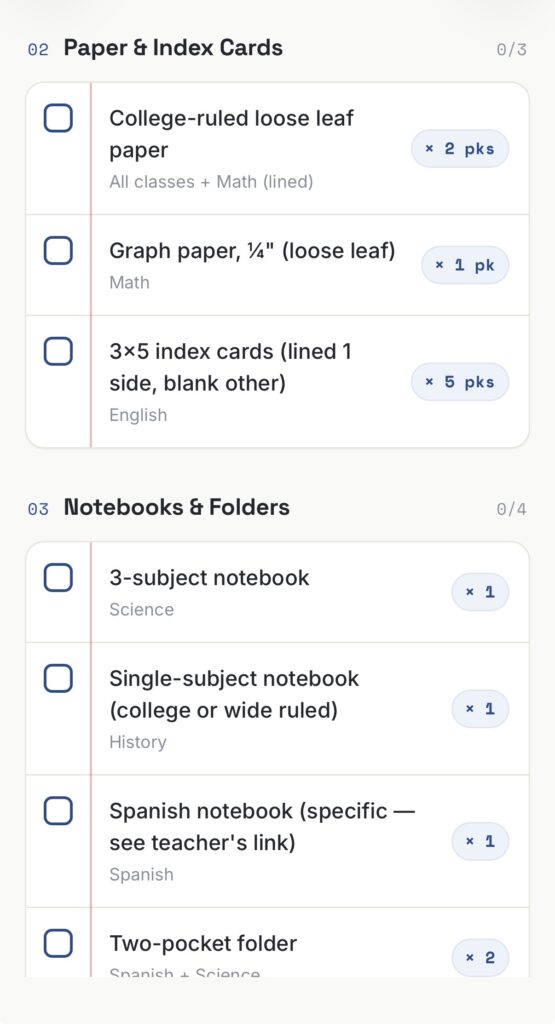
Within a few moments, we had a complete shopping list in hand and used it to navigate the store with ease. Obviously we double-checked the final list once we had the cart full, but it caught most of it. Interestingly, it did omit a T-Shirt required for Theater class, on the premise that the shirt wouldn’t be available at Office Depot. So – as usual, check the results!
Enabling Claude for Chrome has become an interesting use case of that hybrid state where I do sorta trust the machine to go do stuff on its own, but I’m not fully across the chasm. A couple precautions I take… One, Chrome isn’t my primary daily browser so it doesn’t have access to as many of my credit cards, stored passwords, etc. Secondly, I try to do a cache wipe on Chrome every few days, and more frequently now that I’m letting Claude use the browser itself. There’s less chance of other browsing behavior or something I may have typed into a browser window elsewhere leak into a Claude session.
I found a handy use case on pretty well tread path, namely finding people on LinkedIn. I am attending a conference in a few months and decided I’d like to get a better perspective on the speakers, so I was able to prompt Claude (Cowork Desktop) to review the Speakers page, and then find everyone on LinkedIn. From there, follow each speaker (though I did have to clarify for the prompt not to Connect with the speakers if that was an option; this wasn’t a spam quest). On top of that, put together a social graph of the speakers identifying any 2nd degree connections and who I’m 2nd-degree connected to them through.
Ultimately, this proved to be a very helpful way to review the event and the speakers, and now I’ve got an updated feed on LinkedIn that I’ll look forward to further curating and listening to.